RDAP Endpoint Lookup Tool

Get the RDAP endpoint URL for a TLD or registry that you can use for domain registration lookup queries.

Choose a search category, then select a TLD (e.g., , , ) or a registry name (e.g., , ) to look up its RDAP base endpoint.

RDAP coverage

1,442

TLDs covered

1,209

RDAP-ready

  • 84% listed in IANA’s RDAP bootstrap
  • 2% with RDAP outside the bootstrap
  • 9% WHOIS only
  • 5% no public endpoint
See all coverage stats
Domain Info API

No Time For Manual RDAP Endpoint Hunting? Domain Info Has You Covered.

Domain Info is an API that combines WHOIS and RDAP data to deliver one consolidated record for every domain — active, expired, or deleted, filling out redacted registrant details with historical data.

Try Domain Info

RDAP Endpoints Quickstart Guide

What Is an RDAP Endpoint?

An RDAP endpoint is a URL that accepts Registration Data Access Protocol queries and returns domain, IP, ASN, registrar, or contact registration data in structured JSON format. ICANN requires gTLD registries and registrars to provide RDAP service as the replacement for WHOIS-based registration data access.

For example:

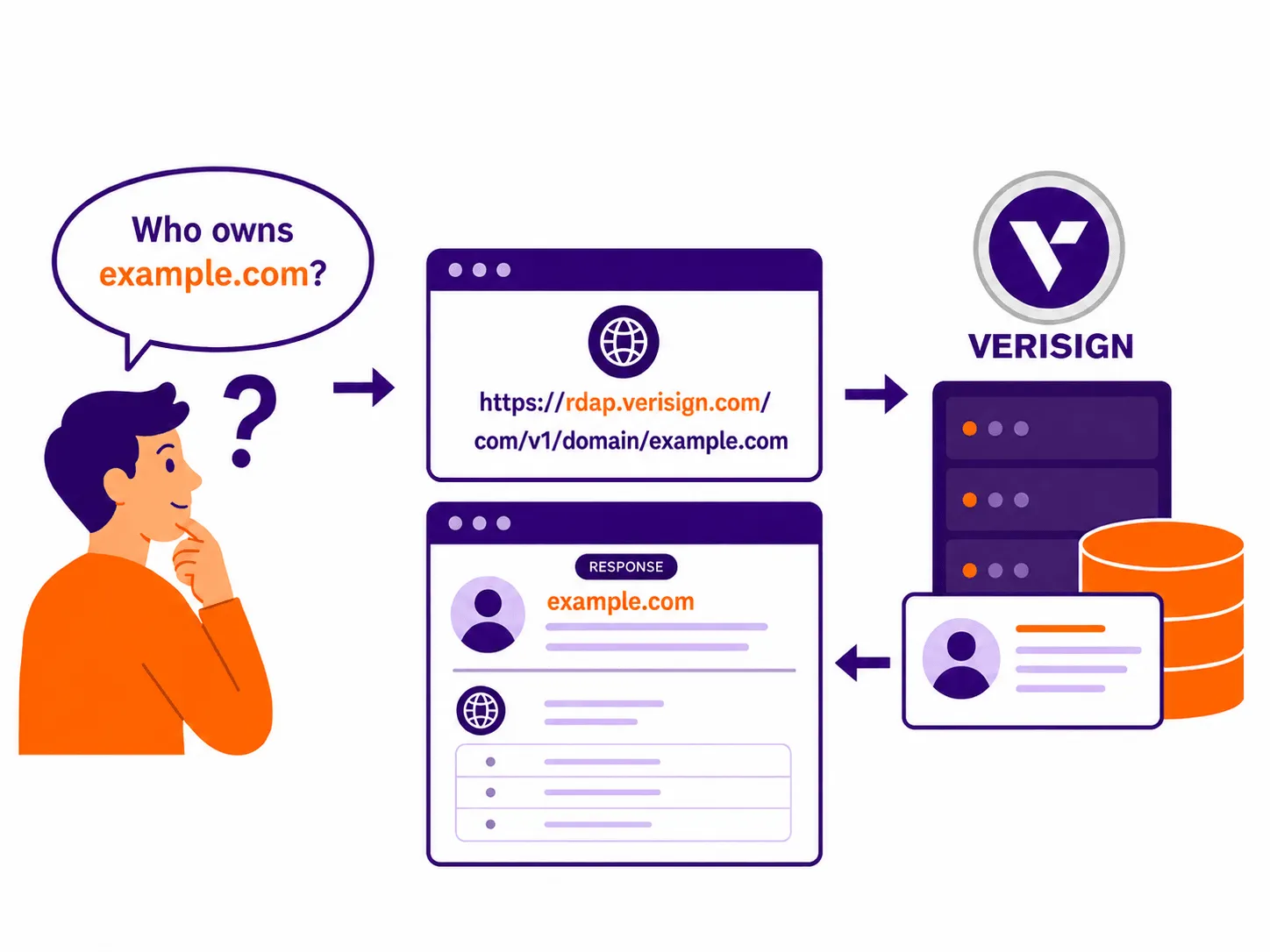
Verisign’s RDAP endpoint for .com domains is https://rdap.verisign.com/com/v1/

A question about who owns example.com goes to Verisign's RDAP endpoint, which returns the domain's registration record

Does Every TLD Have a Unique RDAP Endpoint?

No, not exactly.

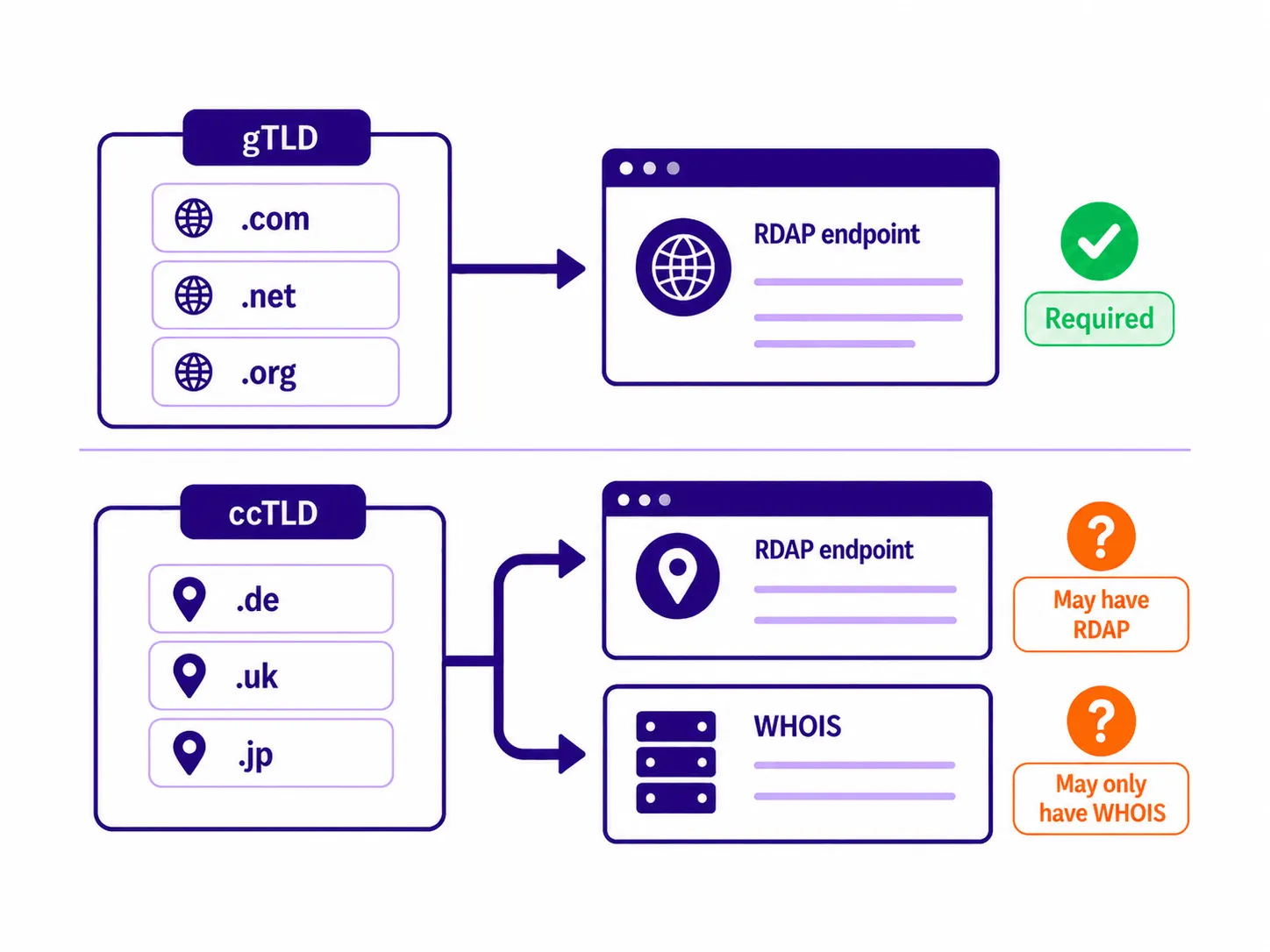
  • Each gTLD has an RDAP endpoint URL that clients can use to route queries for that TLD, as per ICANN requirements. TLDs controlled by the same registry can have the same endpoint.
  • Many ccTLDs still haven’t introduced their own RDAP endpoints and only deliver domain registration data via WHOIS.

For example:

.app is a gTLD, so, as per ICANN requirements, it has an RDAP endpoint. It can be found at https://pubapi.registry.google/rdap/.

But .ae, the ccTLD for the United Arab Emirates, hasn’t introduced RDAP yet, so domain registration data for .ae domains is only available via a WHOIS endpoint — whois.aeda.net.ae.

gTLDs such as .com, .net and .org are required to have an RDAP endpoint; ccTLDs such as .de, .uk and .jp may have RDAP or only WHOIS

How to Use an RDAP Endpoint?

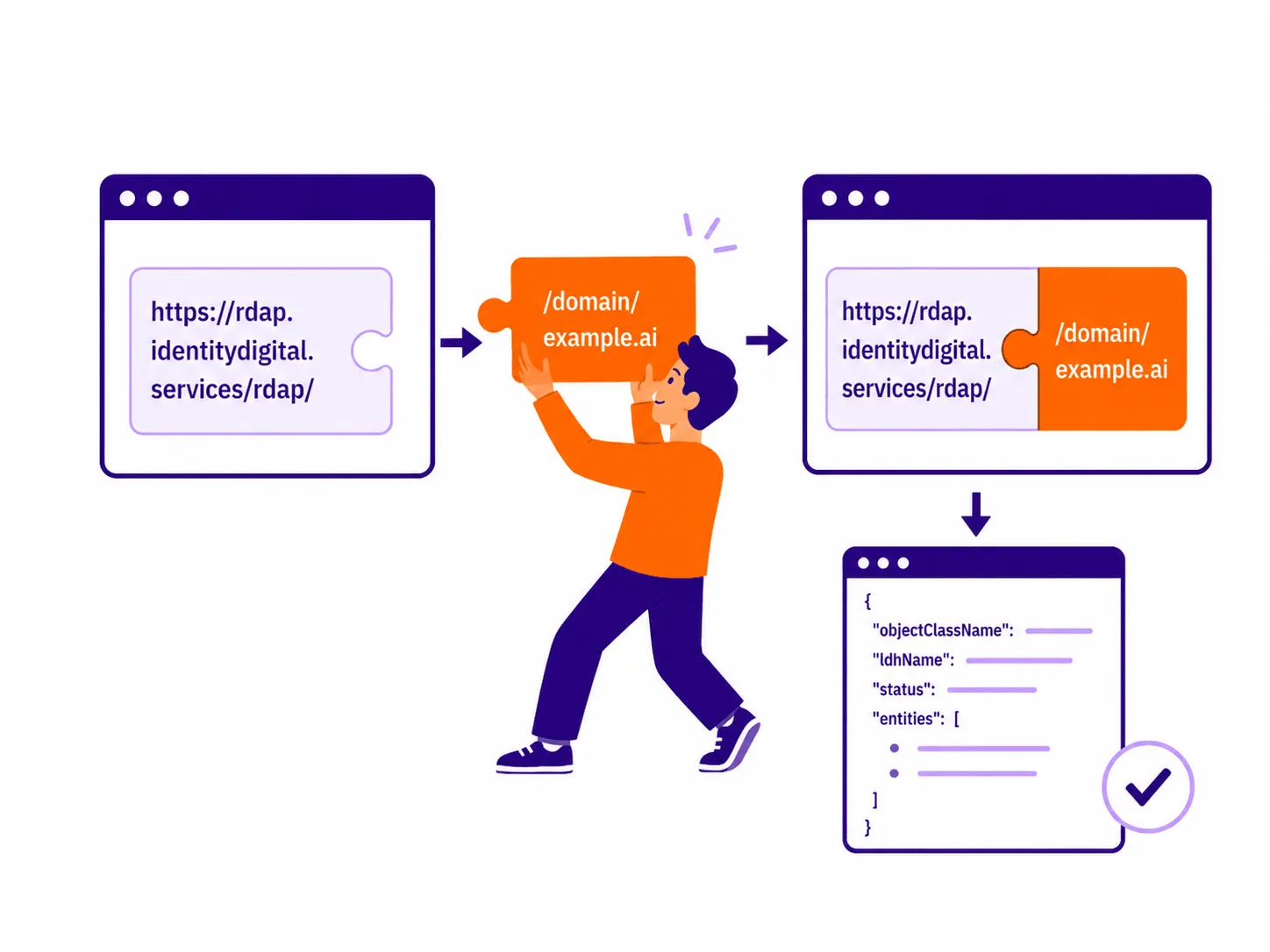
Once you know the correct RDAP endpoint for a TLD or registry, you can use it as the base URL to get domain registration information for domains belonging to this TLD or registry via RDAP. To look up a domain, the domain name is usually added after the /domain/ path, and the response is returned in structured JSON format.

For example:

The RDAP endpoint for .ai is https://rdap.identitydigital.services/rdap/

To look up an .ai domain, the request would look like this:
https://rdap.identitydigital.services/rdap/domain/example.ai

The RDAP base URL plus /domain/example.ai forms the query that returns the domain’s JSON record

RDAP Endpoint vs. WHOIS Server

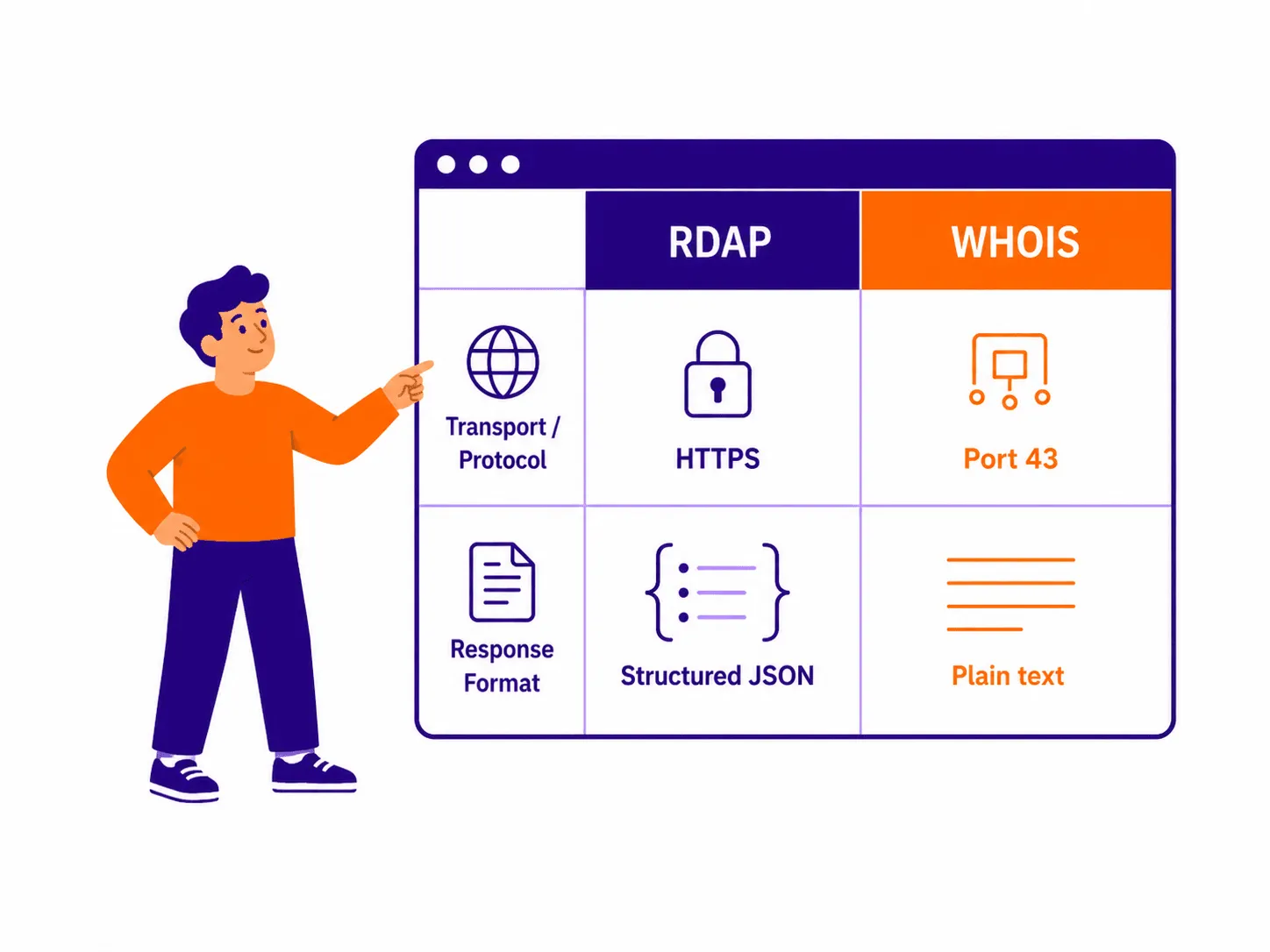
An RDAP endpoint and a WHOIS server can both provide domain registration data, but they use different protocols and formats. RDAP works over HTTPS and returns structured JSON, while WHOIS usually works over port 43 and returns plain text.

For example:

The RDAP endpoint for .io is https://rdap.identitydigital.services/rdap/

To look up an .io domain with RDAP, the request would look like this:
https://rdap.identitydigital.services/rdap/domain/google.io

The WHOIS server for .io is whois.nic.io

RDAP works over HTTPS and returns structured JSON; WHOIS works over port 43 and returns plain text

Get the best from the RDAP and WHOIS worlds

Don’t ever worry about endpoints and get records with the most data that RDAP and WHOIS have to offer, enriched with historical data.

Try Domain Info

What Are RDAP Endpoints Used For?

Knowing the correct RDAP endpoint for a TLD, domain registry, or RIR is the first step in any of these workflows.

Direct domain and IP address lookups

Direct domain and IP address lookups

Having the right RDAP endpoint helps you bypass central RDAP bootstrap routing, allowing you to point tools directly to an authoritative server to retrieve structured IP and domain registration data, including domain name status, registration dates, registrant information, AS numbers, and network blocks.

Automation and API integration

Automation and API integration

RDAP queries return machine-readable JSON responses, making automation easier. Programmers running low query volumes can integrate endpoint URLs into security pipelines and pull real-time infrastructure data into monitoring platforms with far less friction than with WHOIS.

Avoiding bootstrap rate limiting

Avoiding bootstrap rate limiting

Routing queries through IANA’s bootstrap introduces latency and risks hitting aggressive rate limits. Querying a registry's RDAP endpoint directly spreads out the volume and skips that bottleneck. Registries still set their own limits, though, so high-volume users need an RDAP API or some other tool to avoid these limitations.

Running authenticated RDAP queries

Running authenticated RDAP queries

Privileged users — like law enforcement — can unlock restricted and unredacted domain registrant data by running authenticated queries. Because RDAP supports a secure, federated identity system, the query must connect directly to the correct registry URL to initiate the secure login handshake and process the required session tokens.

API

API Calls Available

Need API access? Check RDAP adoption per TLD via API, including .com, .ai, .io, .app, .org, and .xyz registry endpoints, along with each server’s service status.

Learn more about API integration

Frequently Asked Questions

An RDAP endpoint is the authoritative URL hosted by a domain registry or Regional Internet Registry (RIR) that allows anyone to query domain registration data (ownership, dates, nameservers, status) over HTTPS. Instead of returning raw text like legacy WHOIS, querying an RDAP endpoint returns machine-readable JSON responses.

For example, Verisign hosts the official endpoint for all .com registrations at the base URL https://rdap.verisign.com/com/v1/. You can query the RDAP server directly on a browser or command line using this domain lookup endpoint: https://rdap.verisign.com/com/v1/domain/example.com, which returns this output:

{
  "objectClassName": "domain",
  "handle": "2336799_DOMAIN_COM-VRSN",
  "ldhName": "EXAMPLE.COM",
  "links": [
    {
      "value": "https://rdap.verisign.com/com/v1/domain/EXAMPLE.COM",
      "rel": "self",
      "href": "https://rdap.verisign.com/com/v1/domain/EXAMPLE.COM",
      "type": "application/rdap+json"
    }
  ],
  "status": [
    "client delete prohibited",
    "client transfer prohibited",
    "client update prohibited"
  ],
  "entities": [
    {
      "objectClassName": "entity",
      "handle": "376",
      "roles": [
        "registrar"
      ],
      "publicIds": [
        {
          "type": "IANA Registrar ID",
          "identifier": "376"
        }
      ],
      "vcardArray": [
        "vcard",
        [
          [
            "version",
            {},
            "text",
            "4.0"
          ],
          [
            "fn",
            {},
            "text",
            "RESERVED-Internet Assigned Numbers Authority"
          ]
        ]
      ],
      "entities": [
        {
          "objectClassName": "entity",
          "roles": [
            "abuse"
          ],
          "vcardArray": [
            "vcard",
            [
              [
                "version",
                {},
                "text",
                "4.0"
              ],
              [
                "fn",
                {},
                "text",
                ""
              ],
              [
                "tel",
                {
                  "type": "voice"
                },
                "uri",
                ""
              ],
              [
                "email",
                {},
                "text",
                ""
              ]
            ]
          ]
        }
      ]
    }
  ],
  "events": [
    {
      "eventAction": "registration",
      "eventDate": "1995-08-14T04:00:00Z"
    },
    {
      "eventAction": "expiration",
      "eventDate": "2026-08-13T04:00:00Z"
    },
    {
      "eventAction": "last changed",
      "eventDate": "2026-01-16T18:26:50Z"
    },
    {
      "eventAction": "last update of RDAP database",
      "eventDate": "2026-07-01T03:56:27Z"
    }
  ],
  "secureDNS": {
    "delegationSigned": true,
    "dsData": [
      {
        "keyTag": 2371,
        "algorithm": 13,
        "digestType": 2,
        "digest": "C988EC423E3880EB8DD8A46FE06CA230EE23F35B578D64E78B29C3E1C83D245A"
      }
    ]
  },
  "nameservers": [
    {
      "objectClassName": "nameserver",
      "ldhName": "ELLIOTT.NS.CLOUDFLARE.COM"
    },
    {
      "objectClassName": "nameserver",
      "ldhName": "HERA.NS.CLOUDFLARE.COM"
    }
  ],
  "rdapConformance": [
    "rdap_level_0",
    "icann_rdap_technical_implementation_guide_1",
    "icann_rdap_response_profile_1"
  ],
  "notices": [
    {
      "title": "Terms of Service",
      "description": [
        "Service subject to Terms of Use."
      ],
      "links": [
        {
          "href": "https://www.verisign.com/domain-names/registration-data-access-protocol/terms-service/index.xhtml",
          "type": "text/html",
          "value": "https://rdap.verisign.com/com/v1/domain/example.com",
          "rel": "terms-of-service"
        }
      ]
    },
    {
      "title": "Status Codes",
      "description": [
        "For more information on domain status codes, please visit https://icann.org/epp"
      ],
      "links": [
        {
          "href": "https://icann.org/epp",
          "type": "text/html"
        }
      ]
    },
    {
      "title": "RDDS Inaccuracy Complaint Form",
      "description": [
        "URL of the ICANN RDDS Inaccuracy Complaint Form: https://icann.org/wicf"
      ],
      "links": [
        {
          "href": "https://icann.org/wicf",
          "type": "text/html",
          "value": "https://rdap.verisign.com/com/v1/domain/example.com",
          "rel": "help"
        }
      ]
    }
  ]
}

No. ICANN mandated RDAP for all gTLD registries and registrars, and the WHOIS sunset took effect on January 28, 2025. Country-code TLDs (ccTLDs) are not under the same mandate, so ccTLD adoption depends on the national or regional body that manages the TLD.

As of June 2026, only 1,194 TLDs had advertised RDAP adoption. You can track this using our TLD RDAP Monitor.

RDAP domain endpoints follow a consistent path pattern: {base-url}/domain/{domain-name}, which returns JSON responses. Below are a few examples of RDAP endpoints:

An RIR RDAP endpoint is used to query IP address and ASN registration data from an RIR instead of domain data from a TLD registry. Common RIRs include ARIN, APNIC, RIPE NCC, LACNIC, and AFRINIC. There are five of them altogether:

RIR RDAP endpoints are useful when you need information about IP address allocations, AS numbers, network blocks, and related registration records.

The path /com/v1/ identifies the TLD (com) and the API version (v1). The full base URL, https://rdap.verisign.com/com/v1/, is the service root for Verisign's .com RDAP server. For .net, the equivalent is https://rdap.verisign.com/net/v1/. For other TLDs Verisign manages, the pattern is https://tld-rdap.verisign.com/{TLD}/v1/.

An RDAP endpoint is tied to the backend infrastructure that a registry operator runs on. When a registry changes its backend provider, the endpoint URL may change with it. Domain name registries must notify IANA of the change to update the endpoints registered in the IANA Bootstrap file, but there can be a lag.

This RDAP Endpoint Lookup Tool checks the bootstrap file for the current registered URL, whether you are checking a .com, .ai, .io, .app, .org, or .xyz registry endpoint, and verifies whether the endpoint is live, so you get the most up-to-date information available.

RDAP and WHOIS have several differences:

  • Transport: WHOIS runs over an unencrypted TCP connection on port 43, while RDAP runs over HTTPS.
  • Output format: WHOIS returns plain text with no standard format. RDAP returns structured JSON responses, with defined object types and consistent field names across registries.
  • Access control: RDAP supports differentiated responses based on user type, plus internationalized data. WHOIS does not.
  • Standard: RDAP was defined by the Internet Engineering Task Force (IETF) across several RFCs, including RFC 7480, RFC 9082, and RFC 9083.
  • Adoption status: ICANN removed the WHOIS requirement for gTLD registries on January 28, 2025. RDAP is now the official protocol for gTLDs. Some registry operators still run WHOIS alongside RDAP.

No, RDAP doesn’t display registrant contact information in a standard query, but this is not a protocol limitation. Since the enforcement of GDPR in 2018, registrant information such as the name, email, phone number, and mailing address has been redacted for most domain names. This privacy protection applies to WHOIS as well.

The registrant contact information still exists in the registry's records, but it is hidden from the public. If you need to see this restricted information, you may need to use the Registration Data Request Service (RDRS) or the relevant registrar’s disclosure process and demonstrate a legitimate and verified reason to access it.

You can also try using the Domain Info API, which uncovers redacted registrant contact details by pulling fields from public WHOIS history snapshots. It combines WHOIS and RDAP data to deliver one consolidated record for both active and expired domains, giving you a better chance of obtaining the registrant contact information you need.

Trusted by
the smartest
companies

You may be interested

Have questions?

We are here to listen. For a quick response, please select your request type. By submitting a request, you agree to our Terms of Service and Privacy Policy.

Sales
Technical Support
Account issues
Product customization

Message sent!

We'll contact you shortly.

Oops!

Something went wrong. Contact us via regular email.